

Use Bub as an ACP agent
This tutorial shows how to expose Bub as an Agent Client Protocol agent. ACP is a protocol that standardizes communication between code editors and coding agents, so an editor can talk to an agent without a custom integration for each one.
Bub already works through the command line and channel integrations such as IM gateways. ACP adds a practical path into graphical clients that already support the protocol, without requiring Bub to grow its own full editor UI first.
By the end, you will have Bub available from an ACP-compatible editor. The example uses Zed because it supports custom ACP agents through agent_servers, but the Bub side is the same for any ACP client that launches an agent process over stdio.
Before you begin
Section titled “Before you begin”You need:
- Bub installed in a Python environment where you can run
bub --help. - A working Bub model configuration. Confirm this outside the editor first with
bub run. - An editor or client that can launch a custom ACP agent. This tutorial uses Zed.
This tutorial does not configure a model provider. Bub reads its normal configuration and environment variables when the ACP process starts, just like bub run or bub chat.
1. Install the ACP server plugin
Section titled “1. Install the ACP server plugin”bub-acp-server lives in bubbuild/bub-contrib. Install it into the same environment that provides your bub command:
bub install bub-acp-server@mainVerify that the command is available:
bub acp serve --helpExpected output includes:
Usage: bub acp serve [OPTIONS]If bub acp is missing, the plugin was installed into a different Python environment than the one your shell resolves as bub.
2. Check Bub before adding the editor
Section titled “2. Check Bub before adding the editor”Run one turn from the same shell or environment that your editor will use:
bub run "Reply with one short sentence: hello from Bub."Fix any Bub configuration or network issue here first. ACP only changes the transport between the editor and Bub; it does not replace Bub’s model configuration.
If your Bub configuration is stored in a project .env, make sure the ACP process starts with that environment loaded. One portable way is to create a small wrapper script:
#!/usr/bin/env bash
set -euo pipefail
cd /path/to/your/project
set -a
. ./.env
set +a
exec bub acp serve
Use this wrapper only when you need it. If bub run already works from the editor’s environment, you can launch bub acp serve directly.
3. Configure Zed
Section titled “3. Configure Zed”Open Zed’s settings with zed: open settings and add a custom agent server:
{
  "agent_servers": {
    "Bub": {
      "type": "custom",
      "command": "bub",
      "args": ["acp", "serve"],
      "env": {}
    }
  }
}
If Zed cannot find bub, use an absolute path or the wrapper script from the previous step:
{
  "agent_servers": {
    "Bub": {
      "type": "custom",
      "command": "/path/to/bub-acp-wrapper",
      "args": [],
      "env": {}
    }
  }
}
Keep editor configuration and Bub configuration separate. Zed starts the ACP process and passes the environment you put under agent_servers.Bub.env; Bub still owns its model settings, tools, skills, tapes, and plugin configuration.
4. Start a Bub thread
Section titled “4. Start a Bub thread”Reload Zed after saving settings. Open the agent panel with cmd-? on macOS or ctrl-? on Linux and Windows, then use the agent selector in the empty state or the + button in the top right to create a new thread and select Bub.
Send a small message such as:
HELLOYou should see Bub respond in the agent panel. Tool calls and streamed model text are forwarded as ACP session updates, so the editor can show activity while the turn is running.
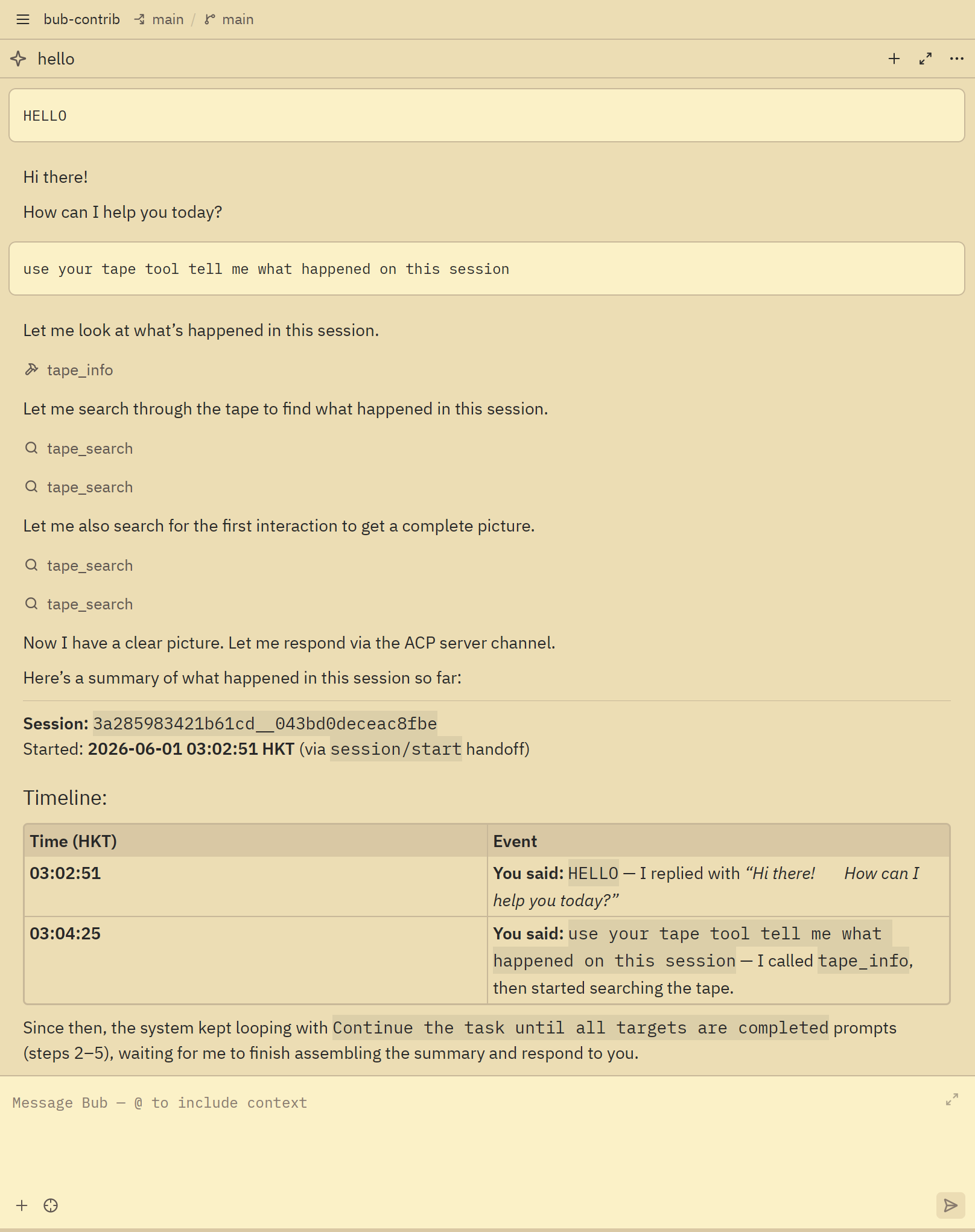
When the editor reopens an existing thread, bub-acp-server loads the matching Bub tape and replays it through the same ACP streaming path used by live turns. That keeps restored user messages, assistant text, and tool events aligned with how Bub records the session.
Troubleshooting
Section titled “Troubleshooting”| Symptom | Check |
|---|---|
bub acp is missing | Reinstall bub-acp-server into the environment that provides the bub executable used by the editor. |
| The editor says it cannot start Bub | Use an absolute command path, or point command at a wrapper script that activates the right environment. |
| Bub starts but reports a configuration error | Confirm bub run works in the same environment. If required settings are in .env, load that file before bub acp serve. |
| The editor cannot load or resume a thread | Confirm the editor is launching the same bub environment where bub acp serve --help works, and keep BUB_HOME stable across launches. |
| Previous threads disappear after restarting the editor | Keep the same Bub environment and BUB_HOME across launches. bub-acp-server stores ACP session metadata under Bub home and loads history from Bub tapes. |
| A turn starts but no activity is visible | Open Zed’s dev: open acp logs command and inspect the JSON-RPC messages between Zed and Bub. |
Next steps
Section titled “Next steps”- Configure — Bub’s model and runtime settings.
- Turn pipeline — how Bub turns inbound messages into model calls and outbound messages.
- Build plugins — extend Bub with hooks, tools, and channels.